Hi Everyone!!
In this post, I will be covering the way OPMN manages the mid-tier services in R12.
you may would like to review the R12 installation post.
Once you have done the R12 installation, Mid-Tiers will be brought up automatically.
How Mid-Tier services are managed in R12??
R12 uses 10.1.3 fusion middle-ware AS stack, hence services in R12 is managed by OPMN(Oracle Process Manager and Notification Server). OPMN consists of two main components (Oracle Process Manager) and (Oracle Notification Server).
Oracle Process Manager is responsible for
1) starting
2) stopping
3) restarting
4) monitoring the services it manages (this includes death detection and automatic restart of the process)
Oracle Notification Server is the transport mechanism for failure, recovery, startup, and other related notifications between components in AS.
Single configuration file(opmn.xml) is used OPMN to manage the services. Config file location is given as $ORA_CONFIG_HOME/10.1.3/opmn/conf/opmn.xml
Services managed by opmn are (grep process-type opmn.xml)
1) HTTP_Server
2) oacore
3) forms
4) oafm
There are many benefits because of OPMN. To give an example,
Consider the scenario where one of your OC4J process has died. OPMN detects the death of the process which it manages and brings up in almost no time.
to elucidate this here is an example
-bash-2.05b$ ./adopmnctl.sh status
You are running adopmnctl.sh version 120.4
Checking status of OPMN managed processes...
Processes in Instance: r12test_ap6155rt.ap6155rt.us.oracle.com
-------------------+--------------------+---------+---------
ias-component | process-type | pid | status
-------------------+--------------------+---------+---------
OC4J | oafm | 30031 | Alive
OC4J | forms | 29934 | Alive
OC4J | oacore | 10444 | Alive
HTTP_Server| HTTP_Server| 29795 | Alive
ASG | ASG | N/A | Down
adopmnctl.sh: exiting with status 0
adopmnctl.sh: check the logfile /slot01/appmgr/R12/inst/apps/r12test_ap6155rt/logs/appl/admin/log/adopmnctl.txt for more information ...
-bash-2.05b$
All the OPMN managed processes are alive. Lets see, how opmn reacts to the death of the oacore OC4J process. I have killed the process with PID - 10444
-bash-2.05b$ kill -9 10444
-bash-2.05b$ ./adopmnctl.sh status
You are running adopmnctl.sh version 120.4
Checking status of OPMN managed processes...
Processes in Instance: r12test_ap6155rt.ap6155rt.us.oracle.com
-------------------+--------------------+---------+---------
ias-component | process-type | pid | status
-------------------+--------------------+---------+---------
OC4J | oafm | 30031 | Alive
OC4J | forms | 29934 | Alive
OC4J | oacore | 18813 | Init
HTTP_Server| HTTP_Server| 29795 | Alive
ASG | ASG | N/A | Down
adopmnctl.sh: exiting with status 0
adopmnctl.sh: check the logfile /slot01/appmgr/R12/inst/apps/r12test_ap6155rt/logs/appl/admin/log/adopmnctl.txt for more information ...
-bash-2.05b$
-bash-2.05b$ ./adopmnctl.sh status
You are running adopmnctl.sh version 120.4
Checking status of OPMN managed processes...
Processes in Instance: r12test_ap6155rt.ap6155rt.us.oracle.com
-------------------+--------------------+---------+---------
ias-component | process-type | pid | status
-------------------+--------------------+---------+---------
OC4J | oafm | 30031 | Alive
OC4J | forms | 29934 | Alive
OC4J | oacore | 18813 | Alive
HTTP_Server| HTTP_Server| 29795 | Alive
ASG | ASG | N/A | Down
adopmnctl.sh: exiting with status 0
adopmnctl.sh: check the logfile /slot01/appmgr/R12/inst/apps/r12test_ap6155rt/logs/appl/admin/log/adopmnctl.txt for more information ...
-bash-2.05b$
Within no time, OPMN detects the death and restarts the process it manages.(one or two seconds users will face the failures due to the process unavailability to serve the requests)
$LOG_HOME/ora/10.1.3/opmn/opmn.log is appened with the information ( it dumps the death detection and restart information)
08/01/21 07:09:45 [pm-process] Process Crashed: OC4J~oacore~default_group~1 (1238509304:10444) - Restarting
08/01/21 07:09:45 [pm-process] Starting Process: OC4J~oacore~default_group~1 (1238509305:0)
08/01/21 07:09:56 [pm-process] Process Alive: OC4J~oacore~default_group~1 (1238509305:18813)
This is one of greatest advantage you will get when you have R12, Even if oacore JVM crashes due to out of memory issue, opmn restarts after it detects OC4J has died.
What algorithm OPMN uses to detect the death?
1) OS process is checked by OPMN for every 2 seconds.
2) forward ping: periodically OPMN pings the process for every 20 seconds and expects response
3) reverse ping: every 20 seconds managed process sends OPMN a ping notification
So, as a administrator you may not find the issue that are existing in your environment till you review opmn logs as opmn restarts the process in no time, its rare people identifies the issue and raises support ticket.!!! :-)
I hope you find this article useful.
Leave your comments.!!
Showing posts with label R12. Show all posts
Showing posts with label R12. Show all posts

R12 single node single user Installation.
Hello All!!
Here is the interesting stuffs. I have talked about R12 in the earlier posts. Till now I haven't talked about the installation!!.
Purpose of this installation:
single node, single user R12 application system for demonstrating R12 rapid install.
Requirements:
1) Disk space requirement:
2) OS user accounts - I used appmgr01(only one user)
3) OS Utilities like ar, gcc, g++, ld, ksh, make, X Display Server must exist in PATH.
To check the preinstall requirments, you can download the script mentioned in the note Note 402310.1 and can verify.
This is demonstration purpose only, please do your homework as per the requirement of your nature of business, and do the architecture accordingly.
Stage the R12 DVD's. for this run "perl /mnt/cdrom/Disk1/rapidwiz/adautostg.pl"
Details can be found at installation doc http://download.oracle.com/docs/cd/B40089_05/current/acrobat/120oaig.pdf
Installation:
go to the stage area and run rapidwiz.


You have done the installation of R12 using RI now!!!
Guess how long it has taken to install??
...
... believe me!! it just took around 90 minutes in my system!!!... less than 100 minutes.!!
Beautiful UI is shown when you login to R12 application!!

Hope you have enjoyed this post!!
Here is the interesting stuffs. I have talked about R12 in the earlier posts. Till now I haven't talked about the installation!!.
Purpose of this installation:
single node, single user R12 application system for demonstrating R12 rapid install.
Requirements:
1) Disk space requirement:
| Node | Space Required |
| Mid-Tier | 28GB |
| DB Tier – Prod | 45GB |
| DB Tier – Vision | 133GB |
2) OS user accounts - I used appmgr01(only one user)
3) OS Utilities like ar, gcc, g++, ld, ksh, make, X Display Server must exist in PATH.
To check the preinstall requirments, you can download the script mentioned in the note Note 402310.1 and can verify.
This is demonstration purpose only, please do your homework as per the requirement of your nature of business, and do the architecture accordingly.
Stage the R12 DVD's. for this run "perl /mnt/cdrom/Disk1/rapidwiz/adautostg.pl"
Details can be found at installation doc http://download.oracle.com/docs/cd/B40089_05/current/acrobat/120oaig.pdf
Installation:
go to the stage area and run rapidwiz.


You have done the installation of R12 using RI now!!!
Guess how long it has taken to install??
...
... believe me!! it just took around 90 minutes in my system!!!... less than 100 minutes.!!
Beautiful UI is shown when you login to R12 application!!

Hope you have enjoyed this post!!
R12 Single Node Single User Installation - In depth Discussion
In my last post I have discussed about the installation of Oracle Ebiz R12 in single node, single user mode. You may like to review Sigle node instllation post
In this post I discuss what happens internally. This is the command I have fired to install the application.
-bash-2.05b$ ./rapidwiz
Rapid Install Wizard is validating your file system......
4 dvd labels found
Rapid Install Wizard will now launch the Java Interface.....
-bash-2.05b$ Configuration file written to: /slot01/appmgr/R12/db/tech_st/10.2.0/appsutil/conf_r12test.txt
Configuration file written to: /slot01/appmgr/R12/apps/apps_st/appl/admin/ap6155rt/conf_r12test.txt
Configuration file written to: /slot01/appmgr/R12/inst/apps/r12test_ap6155rt/conf_r12test.txt
Database logfile - /slot01/appmgr/R12/db/tech_st/10.2.0/appsutil/log/r12test_ap6155rt/01050832.log
Appltop logfile - /slot01/appmgr/R12/inst/apps/r12test_ap6155rt/logs/01050832.log
-bash-2.05b$
In the session, I have been given two logs.
1) DB log file
2) Application Side Log file
If you read the DB log file and application log file you will come to know installation uses Rapid Cloning method. Hence the installation takes less than 100 minutes. Its really Rapid Install...!!!
25 Steps that Happens during rapidwiz
1) It prompts you the details of the installation
2) It dumps all the values you have fed in log files for reference
3) Instantiates context template files
4) It builds the DB side context xml
5) It checks the ports availability
6) It performs OS User and Group Checks
7) It does Port Uniqueness Check
8) File System Check - whether file system is writable
9) File Space check
10) Host Domain check - It uses ping utility to check the reachability of the host
11) It copies DB techstack and configures (oracle.apps.ad.clone.ApplyDBTechStack)
12) It installs the DB either vision or prod depending on the selection and does apply portion of DB(oracle.apps.ad.clone.ApplyDatabase)
13) Performs character set conversion. In our case I have selected UTF8, default was ASCII7
14) Bounces DB
15) Runs DB side Autoconfig
16) Brings up the DB listener ( End of DB portion of install)
17) Mid-Tier iAS stack installation(adrunias.sh)
18) registration(oracle.apps.ad.clone.ApplyAppsTechStack -phase reg),configuration(-phase cfg) of Mid Tier
19) Installing Appltop
20) copying appltop context file
21) registering appltop( oracle.apps.ad.clone.ApplyApplTop - -phase reg)
22) Autoconfig Mid-Tier node
23) starts the MT services
24) Test of installation ( DBC File, env file tests, HTTP test, Help page test, Virtual Directory test), JSP ping test, Login page test
25) Summarizes the installation in screen
Review the installation logs for errors!!
You are expected here to do through manual testing!!!
Happy Reading!!
In this post I discuss what happens internally. This is the command I have fired to install the application.
-bash-2.05b$ ./rapidwiz
Rapid Install Wizard is validating your file system......
4 dvd labels found
Rapid Install Wizard will now launch the Java Interface.....
-bash-2.05b$ Configuration file written to: /slot01/appmgr/R12/db/tech_st/10.2.0/appsutil/conf_r12test.txt
Configuration file written to: /slot01/appmgr/R12/apps/apps_st/appl/admin/ap6155rt/conf_r12test.txt
Configuration file written to: /slot01/appmgr/R12/inst/apps/r12test_ap6155rt/conf_r12test.txt
Database logfile - /slot01/appmgr/R12/db/tech_st/10.2.0/appsutil/log/r12test_ap6155rt/01050832.log
Appltop logfile - /slot01/appmgr/R12/inst/apps/r12test_ap6155rt/logs/01050832.log
-bash-2.05b$
In the session, I have been given two logs.
1) DB log file
2) Application Side Log file
If you read the DB log file and application log file you will come to know installation uses Rapid Cloning method. Hence the installation takes less than 100 minutes. Its really Rapid Install...!!!
25 Steps that Happens during rapidwiz
1) It prompts you the details of the installation
2) It dumps all the values you have fed in log files for reference
3) Instantiates context template files
4) It builds the DB side context xml
5) It checks the ports availability
6) It performs OS User and Group Checks
7) It does Port Uniqueness Check
8) File System Check - whether file system is writable
9) File Space check
10) Host Domain check - It uses ping utility to check the reachability of the host
11) It copies DB techstack and configures (oracle.apps.ad.clone.ApplyDBTechStack)
12) It installs the DB either vision or prod depending on the selection and does apply portion of DB(oracle.apps.ad.clone.ApplyDatabase)
13) Performs character set conversion. In our case I have selected UTF8, default was ASCII7
14) Bounces DB
15) Runs DB side Autoconfig
16) Brings up the DB listener ( End of DB portion of install)
17) Mid-Tier iAS stack installation(adrunias.sh)
18) registration(oracle.apps.ad.clone.ApplyAppsTechStack -phase reg),configuration(-phase cfg) of Mid Tier
19) Installing Appltop
20) copying appltop context file
21) registering appltop( oracle.apps.ad.clone.ApplyApplTop - -phase reg)
22) Autoconfig Mid-Tier node
23) starts the MT services
24) Test of installation ( DBC File, env file tests, HTTP test, Help page test, Virtual Directory test), JSP ping test, Login page test
25) Summarizes the installation in screen
Review the installation logs for errors!!
You are expected here to do through manual testing!!!
Happy Reading!!
R12: Beware executing rm -rf $COMMON_TOP/_pages/*
Hello Everyone!!
In this post I am covering Clearing Java classes caching in R12.
If you have worked in 11i, you might have done many times, clearing the caches by running
rm -rf $COMMON_TOP/_pages/*
But in R12 if you do that, your login page will not come up, You will see blank screen.
Why? In R12, on the fly compilation of JSP's are disabled.
In R12, by default,
s_jsp_main_mode is set justrun Instead of recompile (which is 11i setting) in $CONEXT_FILE
which will be propagated to oacore config file
$ORA_CONFIG_HOME/10.1.3/j2ee/oacore/application-deployments/oacore/html/orion-web.xml
What is the implication of this Change?
When main_mode = justrun the OC4J container running the OACoreGroup is told that no compilation on the fly is allowed and only (pre)compiled classes are picked up.
Since this requires less checks to be done the performance is improved. Therefore is this the recommended setting for a Production environment where JSP's will only be replaced occasionally.
In cases where development activities are done and JSP pages are changing often this default setting makes things more complicated. Each time a JSP is deployed a manual compilation using the ojspCompile.pl is needed and the OC4J running the oacore needs a restart to pick up the changes. This will also affect other people working on the same environment.
In development environment you may would like to change to 11i setting level.
If you have accidentally removed _pages directory, don't worry, you can get back jsp's. but its going to take around 20 minutes of time to generated compiled .class and .java files under _pages directory. If you are at R12.0.3 level, much improved version of ojspCompile.pl utililty reduces time required to compile the jsp's.
compilation of Jsp's can be done by,
$FND_TOP/patch/115/bin/ojspCompile.pl --compile --quiet
Ref metalink note: 458338.1
If you have not embarked in R12, this info will help you a lot!!
In this post I am covering Clearing Java classes caching in R12.
If you have worked in 11i, you might have done many times, clearing the caches by running
rm -rf $COMMON_TOP/_pages/*
But in R12 if you do that, your login page will not come up, You will see blank screen.
Why? In R12, on the fly compilation of JSP's are disabled.
In R12, by default,
s_jsp_main_mode is set justrun Instead of recompile (which is 11i setting) in $CONEXT_FILE
which will be propagated to oacore config file
$ORA_CONFIG_HOME/10.1.3/j2ee/oacore/application-deployments/oacore/html/orion-web.xml
What is the implication of this Change?
When main_mode = justrun the OC4J container running the OACoreGroup is told that no compilation on the fly is allowed and only (pre)compiled classes are picked up.
Since this requires less checks to be done the performance is improved. Therefore is this the recommended setting for a Production environment where JSP's will only be replaced occasionally.
In cases where development activities are done and JSP pages are changing often this default setting makes things more complicated. Each time a JSP is deployed a manual compilation using the ojspCompile.pl is needed and the OC4J running the oacore needs a restart to pick up the changes. This will also affect other people working on the same environment.
In development environment you may would like to change to 11i setting level.
If you have accidentally removed _pages directory, don't worry, you can get back jsp's. but its going to take around 20 minutes of time to generated compiled .class and .java files under _pages directory. If you are at R12.0.3 level, much improved version of ojspCompile.pl utililty reduces time required to compile the jsp's.
compilation of Jsp's can be done by,
$FND_TOP/patch/115/bin/ojspCompile.pl --compile --quiet
Ref metalink note: 458338.1
If you have not embarked in R12, this info will help you a lot!!
what is new in R12 SSL?
Hello everyone!!
Once again Wish you all a very happy new year!!
Here is the brief on SSL in R12.
You may would like to review 11i with SSL Note 123718.1
If you have implemented already SSL in 11i you may ask what is new in R12 SSL
Changes in R12 SSL from 11i:
-------------------------------
Oracle no longer supports mod_ssl
All certificates are stored in Wallets
mod_ossl module will be the module which handles
SSL in R12 SSL Configurations are placed in ssl.conf rather than mixing SSL related directives in httpd.conf
R12 uses forms servlet listener architecture which doesn't require separate SSL setup
ssl.crt and ssl.key directories are obsoleted.
Oracle wallet manager 10g is used - all done using ORAPKI
metalink notes for R12:
------------------------
376694.1
376700.1
Hope this helps to you all!
Once again Wish you all a very happy new year!!
Here is the brief on SSL in R12.
You may would like to review 11i with SSL Note 123718.1
If you have implemented already SSL in 11i you may ask what is new in R12 SSL
Changes in R12 SSL from 11i:
-------------------------------
Oracle no longer supports mod_ssl
All certificates are stored in Wallets
mod_ossl module will be the module which handles
SSL in R12 SSL Configurations are placed in ssl.conf rather than mixing SSL related directives in httpd.conf
R12 uses forms servlet listener architecture which doesn't require separate SSL setup
ssl.crt and ssl.key directories are obsoleted.
Oracle wallet manager 10g is used - all done using ORAPKI
metalink notes for R12:
------------------------
376694.1
Hope this helps to you all!
R12 - Shared Appltier - Sun JRE 1.5.0.13 upgrade
Hi Everyone!!
Today I will be covering R12 Sun JRE plugin 1.5.0.13 Upgrade on Shared appltier file system .
Recently I have done that, in my 12.0.3 environment.
I have talked about Jinitiator in R12 is not certified/supported. You may review the post 'where is my Jinitiator in R12'
My configuration was 12.0.3 environment with JRE Plugin 1.5.0.12, After upgrade
Context variable s_sun_plugin_ver is set to 1.5.0_13
and context variable s_sun_plugin_type is set to jdk.

1) downloaded jre-1_5_0_13-windows-i586-p.exe to from http://java.sun.com/ to the directory $COMMON_TOP/webapps/oacore/util/jinitiator
2) cd $COMMON_TOP/webapps/oacore/util/jinitiator
3) mv jre-1_5_0_13-windows-i586-p.exe to j2se15013.exe
Since my environment is using JRE 1.5.0_12, patch got applied to my system already.
SQL> select bug_id from ad_bugs where bug_number='4377566';
BUG_ID
----------
466119
SQL>
So, I skipped this step.
5) Here is the interesting stuffs, I have shared appltier. All the three nodes are enabled with web-tier. So, I have run the script "txkSetPlugin.sh 15013" from all the nodes after shutting them down. Now my context file as well as $FORMS_WEB_CONFIG_FILE are updated with the new settings.
That's it, upgrade done and voila!! Test the upgrade by checking the version in console.
You can follow the metalink note 393931.1 for this upgrade.
Today I will be covering R12 Sun JRE plugin 1.5.0.13 Upgrade on Shared appltier file system .
Recently I have done that, in my 12.0.3 environment.
I have talked about Jinitiator in R12 is not certified/supported. You may review the post 'where is my Jinitiator in R12'
My configuration was 12.0.3 environment with JRE Plugin 1.5.0.12, After upgrade
Context variable s_sun_plugin_ver is set to 1.5.0_13
and context variable s_sun_plugin_type is set to jdk.

1) downloaded jre-1_5_0_13-windows-i586-p.exe to from http://java.sun.com/ to the directory $COMMON_TOP/webapps/oacore/util/jinitiator
2) cd $COMMON_TOP/webapps/oacore/util/jinitiator
3) mv jre-1_5_0_13-windows-i586-p.exe to j2se15013.exe
4) Since my environment is using JRE 1.5.0_12, patch got applied to my system already.
SQL> select bug_id from ad_bugs where bug_number='4377566';
BUG_ID
----------
466119
SQL>
So, I skipped this step.
5) Here is the interesting stuffs, I have shared appltier. All the three nodes are enabled with web-tier. So, I have run the script "txkSetPlugin.sh 15013" from all the nodes after shutting them down. Now my context file as well as $FORMS_WEB_CONFIG_FILE are updated with the new settings.
That's it, upgrade done and voila!! Test the upgrade by checking the version in console.
You can follow the metalink note 393931.1 for this upgrade.
R12 - Distributed AD Patching
Hello everyone!!
Today I was working on patching of Big RUP patch on Shared appltier - R12 environment. I was running out of time to complete the task. Thought for a while to reduce the patching downtime, took Distributed AD method to reduce the time.
My environment configurations:
3 node mid-tier shared appltier each of 8CPU's and 8Gigs of RAM. (quite healthy).
I decided to have 16 (2* CPU) workers on each node, by summing I will be using 48 workers (whoop!!).

It took one hour less than then normal single node patching. here is the detail how I have applied.
I have exported TWO_TASK (normally two_task is set to Name_BALANCE in RAC with shared appltier) to instance1 of RAC node as AD utilities doesn't use RAC features. (adpatch works perfectly but when patch contains jar files to be uploaded using loadjava utilities it fails making connections to DB using loadbalancing JDBC parameters). This means that I am going to use only node 1 of the DB for all patching. same way I have exported TWO_TASK to instance1 at session level for node2 and node3.
first node I started the patching
adpatch options=hotpatch localworkers=16 workers=48
(response to the prompts, it will start the patching). from the session of node2 run
adctrl distributed=y, respond to the prompt - worker range: 17-32
start the adctrl distributed=y, respond to the prompt - worker range in node3: 33-48
till FND_INSTALL_PROCESS tables get created, distributed adctrl sessions will wait for node1 adpatch. when fnd_install_processes table gets created, distributed workers will be forked and will start the tasks.
its really cool way of reducing downtime - Part No. B31567-02 of R12 document set contains bit more information on this!!
11i note may help you too -note:236469.1
How to check the status of the workers??
You can use the same adctrl command without distributed=Y parameters!!. its going to behave as normal adctrl.
Leave your comments, ideas.!!
Happy learning!!
Today I was working on patching of Big RUP patch on Shared appltier - R12 environment. I was running out of time to complete the task. Thought for a while to reduce the patching downtime, took Distributed AD method to reduce the time.
My environment configurations:
3 node mid-tier shared appltier each of 8CPU's and 8Gigs of RAM. (quite healthy).
I decided to have 16 (2* CPU) workers on each node, by summing I will be using 48 workers (whoop!!).

It took one hour less than then normal single node patching. here is the detail how I have applied.
I have exported TWO_TASK (normally two_task is set to Name
first node I started the patching
adpatch options=hotpatch localworkers=16 workers=48
(response to the prompts, it will start the patching). from the session of node2 run
adctrl distributed=y, respond to the prompt - worker range: 17-32
start the adctrl distributed=y, respond to the prompt - worker range in node3: 33-48
till FND_INSTALL_PROCESS tables get created, distributed adctrl sessions will wait for node1 adpatch. when fnd_install_processes table gets created, distributed workers will be forked and will start the tasks.
its really cool way of reducing downtime - Part No. B31567-02 of R12 document set contains bit more information on this!!
11i note may help you too -note:236469.1
How to check the status of the workers??
You can use the same adctrl command without distributed=Y parameters!!. its going to behave as normal adctrl.
Leave your comments, ideas.!!
Happy learning!!
Unveiled - R12 $INST_TOP
Earlier I have talked about Inst top which got introduced newly in R12 Ebiz Suite.
You may would like to review them before you proceed
R12 Architecture
INST_TOP in R12
Remember there are no jserv.properties or jserv.conf or zone.properties in R12 (new techstack), Jserv is replaced by Oacore!!
This post is going to have configuration files that will fall under INST TOP directory structure.
All the configuration Files are placed under $ORA_CONFIG_HOME
If you go inside this directory you will see 10.1.2 and 10.1.3
10.1.2 configuration files will be residing in 10.1.2. for e.g $FORMS_WEB_CONFIG_FILE is placed under $ORA_CONFIG_HOME/10.1.2 - in my instance it is in /slot/ems1636/appmgr/inst/apps/tkr12r3d_rws60029rems/ora/10.1.2/forms/server/appsweb.cfg
10.1.3 configuration files will be placed under $ORA_CONFIG_HOME/10.1.3/Apache/Apache/conf/
in my instance httpd.conf is located at $ORA_CONFIG_HOME/10.1.3/Apache/Apache/conf/
in my instance it is at /slot/ems1636/appmgr/inst/apps/tkr12r3d_rws60029rems/ora/10.1.3/Apache/Apache/conf
so, good bye to $IAS_ORACLE_HOME/Apache/Apache/conf !!! you will using always $ORA_CONFIG_HOME/10.1.3 to modify Apache configurations in R12. You will be comfortable going forward!!
Same location you will see (all apache related configurations files)
---------------------------
Env file:
---------
$ORA_CONFIG_HOME/10.1.3/$CONTEXT_NAME.env
OH config files: Location: $ORA_CONFIG_HOME/10.1.3/config
---------------
These files are security related/iAS related parameters. Mostly no modifications required manually. OID/SSO registrations scripts modifies directly. I Planned to write separate post for covering these configuration files as each is big ocean by itself.
- ias.properties
- iasschema.xml
- j2ee_instance_jazn.properties
- jazn-data.xml
- jazn.xml
---------------------------------------------------------------------------------------
- apps.conf
- custom.conf
- dms.conf
- httpd.conf
- mod_oc4j.conf - newly introduced for OC4J conf
- mod_osso.conf - replaced mod sso conf
- oracle_apache.conf
- osso
- restricted_mode_apache.conf
- security.conf
- ssl.conf
- ssl_terminator.conf
- trusted.conf
- url_fw.conf
------------------
$ORA_CONFIG_HOME/10.1.3/opmn/conf/opmn.xml
- Used by Oracle Process Manager and Notification Server (OPMN)
- Contains details of all the OC4J instances deployed on the server
- Location of the log files for OPMN
- Various ports used by OPMN
OC4J configuration files:
-------------------------
There are three OC4J deployments in 10.1.3 oracle Homes
they are oacore oc4j, forms oc4j, oafm oc4j. All oc4j's will have similar configuration files.
application.xml
default-web-site.xml
global-web-application.xml
j2ee-logging.xml
jazn.xml
jms.xml
oc4j-connectors.xml
oc4j.properties
ohwconfig.xml
rmi.xml
server.xml
system-application.xml
system-jazn-data.xml
Above configuration files are generic OC4J instances. I will be covering them in detail with example how to migrate the deployments you have made in jserv to oacore. As of now just know which replaces what zone.properties... Its replaced by orion-web.conf (it defines servlet alias, init param serttings etc.). Its under $ORA_CONFIG_HOME/10.1.3/j2ee/oacore/application-deployments/oacore/html
JavaCache config file:
----------------------
$ORA_CONFIG_HOME/10.1.3/javacache/admin/javacache.xml
10.1.2 OH related config Files:
-------------------------------
Env file:
--------
$ORA_CONFIG_HOME/10.1.2/$CONTEXT_NAME.env
Form Server Configuration Files:
---------------------------------
- Location: $ORA_CONFIG_HOME/10.1.2/forms/server
- default.env (replacement of formservlet.ini in 11i)
- socket.env
- appsweb.cfg ($FORMS60_WEB_CONFIG_FILE is replaced with $FORMS_WEB_CONFIG_FILE)
Report Builder config file:
-------------------------
$ORA_CONFIG_HOME/10.1.2/reports/conf/rwbuilder.conf
10.1.2 Listener config files:
---------------------------
$ORA_CONFIG_HOME/10.1.2/network/admin
I believe you got some gist of configuration file system changes in R12. You may ask why this big change?? I have already explained in the post "INST_TOP in R12". In 11..5.10 CU2 if you have implemented shared appltier file system, you will be knowing you how configuration files are generated for each MT nodes. (s_iASconfig_home controls the configuration location location of iAS Top). Stay tuned for more update!!
Happy Learning!!
Techstack Inventory Report for EBS Release 12
Hello Everyone!!
Here is the good utility to check the techstack details of R12 ebiz suite.
After running the utility You will get the techstack details of your R12 environment in HTML report format. You can get in text format too!!
Utility Running Syntax:
------------------------
Run the command in MT
perl $FND_TOP/patch/115/bin/TXKScript.pl -script=$FND_TOP/patch/115/bin/txkInventory.pl -txktop=$APPLTMP -contextfile=$CONTEXT_FILE -appspass=apps -outfile=$OA_HTML/techstack_info.html
You can check the URL http://./OA_HTML/techstack_info.html
Same way you can check in DB tier
perl $ORACLE_HOME/appsutil/bin/TXKScript.pl -script=$ORACLE_HOME/appsutil/bin/txkInventory.pl -txktop=$ORACLE_HOME/appsutil/temp -contextfile=$CONTEXT_FILE -appspass=apps -outfile=$ORACLE_HOME/appsutil/temp/master_db.html
Contents of the report:
-----------------------
DB side contents will look like the one attached here
Mid-Tier techstack inventory page will look like the one attached here
Its very good report having all kinda of information. To name a few
OC4J version
BC4J
It also shows patch set of MT oracle homes and one-off patches applied.
I believe you will be benefited using this script when you are struck how to check the individual components version.
Happy Learning!!
Here is the good utility to check the techstack details of R12 ebiz suite.
After running the utility You will get the techstack details of your R12 environment in HTML report format. You can get in text format too!!
Utility Running Syntax:
------------------------
Run the command in MT
perl $FND_TOP/patch/115/bin/TXKScript.pl -script=$FND_TOP/patch/115/bin/txkInventory.pl -txktop=$APPLTMP -contextfile=$CONTEXT_FILE -appspass=apps -outfile=$OA_HTML/techstack_info.html
You can check the URL http://
Same way you can check in DB tier
perl $ORACLE_HOME/appsutil/bin/TXKScript.pl -script=$ORACLE_HOME/appsutil/bin/txkInventory.pl -txktop=$ORACLE_HOME/appsutil/temp -contextfile=$CONTEXT_FILE -appspass=apps -outfile=$ORACLE_HOME/appsutil/temp/master_db.html
Contents of the report:
-----------------------
DB side contents will look like the one attached here
Mid-Tier techstack inventory page will look like the one attached here
Its very good report having all kinda of information. To name a few
OC4J version
BC4J
| JDK version on HTTP server node | |
| Oracle JDBC driver version using JAVA API (oracle.jdbc.driver.OracleDriver) | |
| Oracle AOLJ version | |
| Oracle BC4J version | |
| Oracle BiBeans version | |
| Oracle HTTP client version | |
| Java object cache | |
| Oracle JRAD libraries version | |
| Oracle MDS version | |
| OA Framework version | |
| Oracle help web version | |
I believe you will be benefited using this script when you are struck how to check the individual components version.
Happy Learning!!
R12 - XML Publisher a.k.a BI Publisher
Oracle XML Publisher, now known as BI publisher is used to present report
output with good look and feel charts, diagrams,pictures etc., It increases the
efficiency of reports. It provides mechanism merge the template files
(how the output should have the look and feel) and data
(which produced from the concurrent request) and produces the nice document
that can be viewed in at the client.
Simple example I can think of is, Active users, In general output of this
request will be in Browser, to improve the look and feel you go for BI publisher.
Not only the Look and feel there are so many benefits you can get are listed in
http://www.oracle.com/technology/products/xml-publisher/index.html
I walk you through the steps involved in making XML publisher reports, with one
example I have mentioned above.
Report Generation steps:
Login as sysadmin user
1) Create the concurrent request which you want to have output based on BI Publisher
2) Instead to create the concurrent program newly alternatively what you can do is
copy the existing concurrent program and modify the settings.
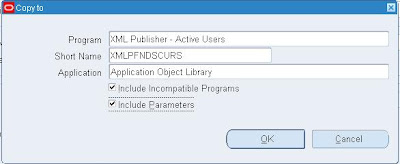
3) In our example I have copied the concurrent request "Active Users" and saved it as
"XML Publisher - Active Users"
steps:
System Administrator -> Concurrent -> Program -> Define
Query Program "Active Users"
Click the "Copy To" Button
Program : XML Publisher - Active User
Short Name: XMLPFNDSCURS
Application: Application Object Library
select Include Incompatible Programs
select Include Parameters
Click OK
Change the Output Format to XML
Save
4) Add your new concurrent program to your required request group
System Administrator -> Security -> Responsibility -> Request
Query Group: System Administrator Reports
Application: Application Object Library
Add new Request:
Program: XML Publisher - Active User
Save

5) Create the Template file using Microsoft Word and save it as XMLP_ActiveUsers.rtf (RTF - Rich Text Format) , this defines how your output should look like
for more advanced graphs, report refer Oracle® XML Publisher,Report Designer's Guide,Release 12,Part No. B31410-01
Content of RTF file:
Refer:

6)Define XML Publisher Data Definition and Template
XML Publisher Administrator -> Data Definitions
Click Create Data Definition
Name: XML Publisher - Active User
Code: XMLPFNDSCURS
Application: Application Object Library
Click Apply
7)
XML Publisher Administrator -> Templates
Click Create Template
Name: XML Publisher - Active User
Code: XMLPFNDSCURS
Application: Application Object Library
Data Definition: XML Publisher - Active User
Type: RTF
Click File, Browse and upload your RTF template file XMLP_ActiveUsers.rtf created earlier
Language: English
Click Apply

8. Run the request
System Administrator -> Requests -> Run
Name: XML Publisher - Active User
Submit
9. View request output
It will look like

You can Refer the documents which comes along with R12 document set to create charts, reports etc.
Oracle® XML Publisher,Administration and Developer's Guide,Release 12, Part No. B31412-01
Oracle® XML Publisher,Report Designer's Guide,Release 12,Part No. B31410-01
Metalink Notes:
Note 362496.1
Note 364547.1
I hope you have learned what really BI Publisher is, since BI Publisher is going to be there in Fusion applications, its better to uptake this technology rather using traditional reporting methods in order to preserve the investment.
I am going to cover this BI publisher in Administrator point of view in the next post!!
output with good look and feel charts, diagrams,pictures etc., It increases the
efficiency of reports. It provides mechanism merge the template files
(how the output should have the look and feel) and data
(which produced from the concurrent request) and produces the nice document
that can be viewed in at the client.
Simple example I can think of is, Active users, In general output of this
request will be in Browser, to improve the look and feel you go for BI publisher.
Not only the Look and feel there are so many benefits you can get are listed in
http://www.oracle.com/technology/products/xml-publisher/index.html
I walk you through the steps involved in making XML publisher reports, with one
example I have mentioned above.
Report Generation steps:
Login as sysadmin user
1) Create the concurrent request which you want to have output based on BI Publisher
2) Instead to create the concurrent program newly alternatively what you can do is
copy the existing concurrent program and modify the settings.
3) In our example I have copied the concurrent request "Active Users" and saved it as
"XML Publisher - Active Users"
steps:
System Administrator -> Concurrent -> Program -> Define
Query Program "Active Users"
Click the "Copy To" Button
Program : XML Publisher - Active User
Short Name: XMLPFNDSCURS
Application: Application Object Library
select Include Incompatible Programs
select Include Parameters
Click OK
Change the Output Format to XML
Save

4) Add your new concurrent program to your required request group
System Administrator -> Security -> Responsibility -> Request
Query Group: System Administrator Reports
Application: Application Object Library
Add new Request:
Program: XML Publisher - Active User
Save

5) Create the Template file using Microsoft Word and save it as XMLP_ActiveUsers.rtf (RTF - Rich Text Format) , this defines how your output should look like
for more advanced graphs, report refer Oracle® XML Publisher,Report Designer's Guide,Release 12,Part No. B31410-01
Content of RTF file:
Refer:

6)Define XML Publisher Data Definition and Template
XML Publisher Administrator -> Data Definitions
Click Create Data Definition
Name: XML Publisher - Active User
Code: XMLPFNDSCURS
Application: Application Object Library
Click Apply
7)
XML Publisher Administrator -> Templates
Click Create Template
Name: XML Publisher - Active User
Code: XMLPFNDSCURS
Application: Application Object Library
Data Definition: XML Publisher - Active User
Type: RTF
Click File, Browse and upload your RTF template file XMLP_ActiveUsers.rtf created earlier
Language: English
Click Apply

8. Run the request
System Administrator -> Requests -> Run
Name: XML Publisher - Active User
Submit
9. View request output
It will look like

You can Refer the documents which comes along with R12 document set to create charts, reports etc.
Oracle® XML Publisher,Administration and Developer's Guide,Release 12, Part No. B31412-01
Oracle® XML Publisher,Report Designer's Guide,Release 12,Part No. B31410-01
Metalink Notes:
Note 362496.1
Note 364547.1
I hope you have learned what really BI Publisher is, since BI Publisher is going to be there in Fusion applications, its better to uptake this technology rather using traditional reporting methods in order to preserve the investment.
I am going to cover this BI publisher in Administrator point of view in the next post!!
Init.ora settings for EBS suite Database
Greetings!!
Here is a note you have to follow for setting init.ora parameters for EBS suite databases.
11i - 216205.1
R12 - 396009.1
Hope this helps you when you upgrade your system to R12 from 11i, or managing R12 instances.
Happy Learning!!
Here is a note you have to follow for setting init.ora parameters for EBS suite databases.
11i - 216205.1
R12 - 396009.1
Hope this helps you when you upgrade your system to R12 from 11i, or managing R12 instances.
Happy Learning!!
SSO/OID integration in R12
I happen to integrate R12 new environment with OID/SSO recently, Here is the information on that. In R12 the registration of R12 with SSO/OID becomes much simple.
Prerequisites:
* R12 Environment
* 10g R2 AS server Infrastructure - standalone installation (not 10.1.2/10.1.3 ORACLE HOMES come with R12, its a separate installation)
Metalink Note to be followed:
376811.1
Steps:
Since SSO integration patch is part of R12 (maintenance pack - 4440000 patch), you need not have to apply any patch in Linux based environment. (Please check for other platforms before carrying out integration)
step 1) Register ORACLE_HOME
1) LDAP host (where infrastructure presents)
2) LDAP Port (both SSL/non SSL)
3) orcladmin password
4) AS Version must be 10.1.2.0.2
Metalink note is clear and concise.
I have done the integration in cloned instance. I had issues doing the integration. Remove References section of the note helped me to resolve the issue.
Prerequisites:
* R12 Environment
* 10g R2 AS server Infrastructure - standalone installation (not 10.1.2/10.1.3 ORACLE HOMES come with R12, its a separate installation)
Metalink Note to be followed:
376811.1
Steps:
Since SSO integration patch is part of R12 (maintenance pack - 4440000 patch), you need not have to apply any patch in Linux based environment. (Please check for other platforms before carrying out integration)
step 1) Register ORACLE_HOME
$FND_TOP/bin/txkrun.pl \
   -script=SetSSOReg \
   -registerinstance=yes
- Registers AS 10.1.3 Oracle Home in OID before SSO or OID registration.
- 10.1.3 Oracle Home registration will happen only once per E-Business Suite deployment including multinode deployments. In multi node configuration it can be done on any node.
step2)
$FND_TOP/bin/txkrun.pl \
   -script=SetSSOReg \
   -registersso=yes
- Creates a single SSO partner application
- Listener Token is set to the site level value of profile option, Applications Database ID (APPS_DATABASE_ID)
step
$FND_TOP/bin/txkrun.pl \
   -script=SetSSOReg \
-registeroid=yes- Registers E-Business Suite with OID using the ProvBiDirection.tmp provisioning profile. This will enable Bidirectional user synchronization with user creation.
1) LDAP host (where infrastructure presents)
2) LDAP Port (both SSL/non SSL)
3) orcladmin password
4) AS Version must be 10.1.2.0.2
Metalink note is clear and concise.
I have done the integration in cloned instance. I had issues doing the integration. Remove References section of the note helped me to resolve the issue.
$FND_TOP/bin/txkrun.pl \
 -script=SetSSOReg \
 -removereferences=Yes
- It validates the arguments
- It removes the Oracle Home Instance preferences, SSO Preferences and Site level profiles, and OID preferences from E-Business Database.
Instance Top in R12
I have briefed R12 architecture in my last post( R12 architecture ). I described that INST_TOP is the most descernible changes that R12 is having from its predecessors. I am going to cover INST_TOP here.
INST TOP directory:
(applmgr) - ls
admin/ appl/ certs/ logs/ ora/ out/ pids/ portal/ rgf/
(applmgr) -

The Whys and wherefores:
You may get a question why is the change??
There is a need to separate
Code
Data
Config
to ease maintenance of the system. To avoid NFS/MUTEX related issues. Above issue will get resolved if the configuration/lcck files are stored in local system. Another advantage is to gain performance accessing local file system is better than NFS file system.
This directory $INST_TOP got introduced newly in R12. Instance top contains all the config files, log files, ssl certificates, document root etc. Addition of this directory makes the middle-tier more organised, since data is kept separate from config/log files. Another advantage is that, multiple instances can easily share the same middle tier. To create a new instance that shares an existing middle-tier, just create a new instance_top with proper config files and NFS mount the middle tier in the server.
I believe this post helped you lot, stay tuned for next update.
INST TOP directory:
(applmgr) - ls
admin/ appl/ certs/ logs/ ora/ out/ pids/ portal/ rgf/
(applmgr) -

The Whys and wherefores:
You may get a question why is the change??
There is a need to separate
Code
Data
Config
to ease maintenance of the system. To avoid NFS/MUTEX related issues. Above issue will get resolved if the configuration/lcck files are stored in local system. Another advantage is to gain performance accessing local file system is better than NFS file system.
This directory $INST_TOP got introduced newly in R12. Instance top contains all the config files, log files, ssl certificates, document root etc. Addition of this directory makes the middle-tier more organised, since data is kept separate from config/log files. Another advantage is that, multiple instances can easily share the same middle tier. To create a new instance that shares an existing middle-tier, just create a new instance_top with proper config files and NFS mount the middle tier in the server.
| INSTANCE TOP - STRUCTURE | |
|---|---|
| $INST_TOP: | |
/admin | |
/scripts | ADMIN_SCRIPTS_HOME: Find all AD scripts here |
/appl | APPL_CONFIG_HOME. For standalone envs, this is set to $APPL_TOP |
/fnd/12.0.0/secure | FND_SECURE: dbc files here |
/admin | All Env Config files here |
/certs | SSL Certificates go here |
/logs | LOG_HOME: Central log file location. All log files are placed here (except adconfig) |
/ora | ORA_CONFIG_HOME |
/10.1.2 | 'C' Oracle home config, Contains tnsnames and forms listener servlet config files |
/10.1.3 | Apache & OC4J config home, Apache, OC4J and opmn This is the 'Java' oracle home configuration for OPMN, Apache and OC4J |
/pids | Apache/Forms server PID files here |
/portal | Apache's DocumentRoot folder |
| AD SCRIPTS | |
|---|---|
| $ADMIN_SCRIPTS_HOME: $INST_TOP/admin/scripts | |
| adautocfg.sh | run autoconfig |
| adstpall.sh | stop all services |
| adstrtal.sh | start all services |
| adapcctl.sh | start/stop/status Apache only |
| adformsctl.sh | start/stop/status OC4J Forms |
| adoacorectl.sh | start/stop/status OC4J oacore |
| adopmnctl.sh | start/stop/status opmn |
| adalnctl.sh | start/stop RPC listeners (FNDFS/FNDSM) |
| adcmctl.sh | start/stop Concurrent Manager |
| gsmstart.sh | start/stop FNDSM |
| jtffmctl.sh | start/stop Fulfillment Server |
| adpreclone.pl | Cloning preparation script |
| adoafmctl.sh | adoafmctl.sh to start/stop/status OC4J oafm (webservice, mapviewer) |
| adexecsql.pl | Execute sql scripts that update the profiles in an AutoConfig run |
| java.sh | Call java executable with additional args, (used by opmn, Conc. Mgr) |
| LOG FILES | |
|---|---|
| Location of various log files | |
| AD Script log files (adapcctl.sh,...) | $INST_TOP/logs/appl/admin/log |
| CM Log Files ($APPLCSF/$APPLLOG) | $INST_TOP/logs/appl/conc/log |
| AD tools log files (adpatch, ...) | $APPL_CONFIG_HOME/admin/$TWO_TASK/log |
| OPMN Log Files (Text & ODL) | $INST_TOP/logs/ora/10.1.3/opmn |
| Apache Log Files (Text & ODL) | $INST_TOP/logs/ora/10.1.3/Apache |
| OC4J Log Files (Text) | $INST_TOP/logs/ora/10.1.3/j2ee/oacore/ |
| OC4J Log Files (ODL) | $INST_TOP/logs/ora/10.1.3/j2ee/oacore/log/oacore_default_group_1/oc4j |
| SSL CERTIFICATES | |
|---|---|
| $INST_TOP/certs | |
/Apache/ewallet.p12 | |
/opmn/cwallet.sso | |
/opmn/ewallet.p12 | |
| certs is the default directory for SSL or any other certificate files used by this instance. To use a centrally staged certificate, change the appropriate context file and run autoconfig | |
I believe this post helped you lot, stay tuned for next update.
R12 Architecture

In this post I am going to cover R12 architecture. Discernible change from its predecessors is INST_TOP.
R12 file system has come up with new model - Code, Data, Configurations are segregated nicely to have easy maintenance, to avert NFS mount issues on shared appltier configuration systems. Autoconfig will not write anything in appltop, commontop area in R12. All instance specific configurations, log files are written in INST_TOP area. Instance Home provides the ability to share Applications and technology stack code among multiple instances. I have highlighted the INST_TOP in the box. In the forthcoming posts I will clearly explain the in depth of INST_TOP(As a DBA you will spend much time in INST_TOP area when you comes to application tier node management ( e.g checking logs, starting/stopping services, ssl certificates management, CONTEXT_FILE modification etc.)
Techstack Components:
DB_TIER:
10.2.0.2 RDBMS ORACLE_HOME
APPL-TIER
10.1.2 C ORACLE_HOME / FORMS ORACLE_HOME (8.0.6 ORACLE HOME equivalence)
10.1.3 Java ORACLE_HOME/OC4J ORACLE_HOME (iAS ORACLE_HOME equivalence)
I hope you enjoyed reading this article. Next post is in-depth of R12. Stay Tuned.
Birth of this Blog
Hello Everybody!!
First of all thanks for spending your time to view my blogspot. Hopefully you will thoroughly enjoy the every bit of it and you will learn and share technical stuffs via this blog. I take this blog to explore oracle applications in detail from the scratch. You can expect lot of materials, scripts, concepts, tips, tools info, metalink note ID's and much more in the forthcoming posts.
 Oracle Ebusiness suite has been evolved for many years - from release 10(smart client, NCA), 11, 11i to 11.5.10CU2 and now R12. It has been a long journey, we are at R12 with most of the apps dba tasks are automated now in R12.
There are huge change in R12 in terms of functionality which customers directly see, in terms of UI(Browser look and feel - swan oriented), in terms of administrator perspective(lot of work have been put in to automate the administrators task), techstack changes etc.As we go, I will cover various facets of R12, 10g AS and the releated techstack components.
First of all thanks for spending your time to view my blogspot. Hopefully you will thoroughly enjoy the every bit of it and you will learn and share technical stuffs via this blog. I take this blog to explore oracle applications in detail from the scratch. You can expect lot of materials, scripts, concepts, tips, tools info, metalink note ID's and much more in the forthcoming posts.
 Oracle Ebusiness suite has been evolved for many years - from release 10(smart client, NCA), 11, 11i to 11.5.10CU2 and now R12. It has been a long journey, we are at R12 with most of the apps dba tasks are automated now in R12.
 There are huge change in R12 in terms of functionality which customers directly see, in terms of UI(Browser look and feel - swan oriented), in terms of administrator perspective(lot of work have been put in to automate the administrators task), techstack changes etc.As we go, I will cover various facets of R12, 10g AS and the releated techstack components.
Subscribe to:
Posts (Atom)
